
From AC to answer — in seconds.
Ask, get the value, get its citation. AvPlot turns FAA advisory circulars into instant, defensible planning outputs — KMZ, DXF, XLSX, PDF.
A 400-page circular in. Deliverables out.
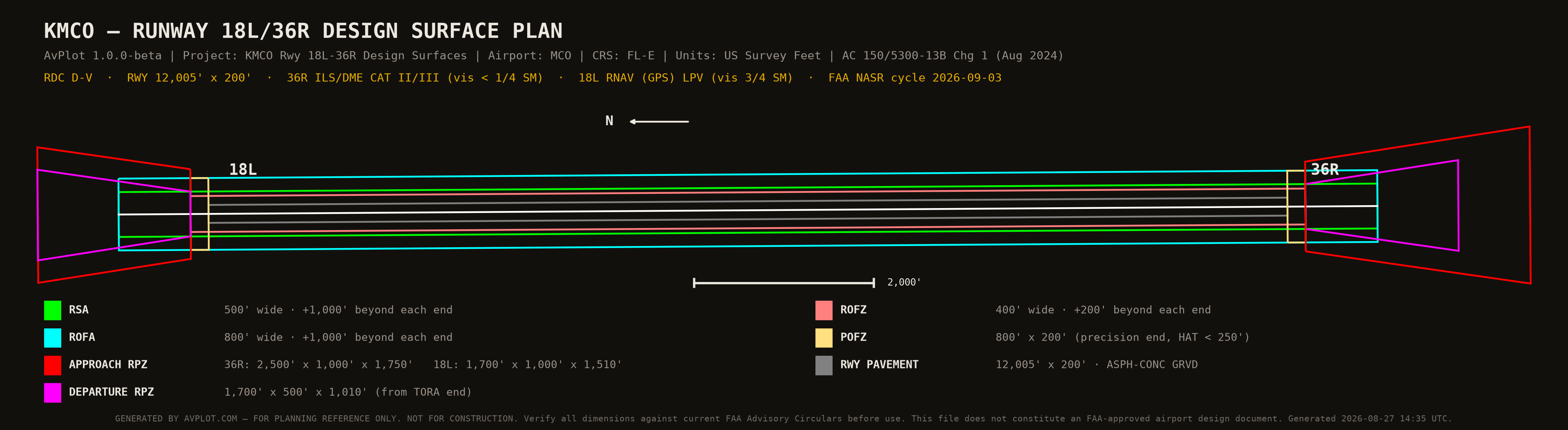
Real engine artifacts for the same runway the console above cites — KMCO Rwy 18L/36R, built end-to-end from published FAA data.
Provenance
| Aircraft | AAC | ADG | Ops (input) |
|---|---|---|---|
| A320 | C | III | 57,930 |
| B738 | D | III | 51,660 |
| A35K | D | V | 1,252 |
| B77W | D | V | 578 |
| MD11 | D | IV | 544 |
| AAC | Cumulative | |
|---|---|---|
| E | 0 | no |
| D | 180,366 | YES |
| C | 393,900 | YES |
| B | 399,750 | YES |
| A | 400,764 | YES |
| ADG | Cumulative | |
|---|---|---|
| VI | 0 | no |
| V | 7,252 | YES |
| IV | 31,224 | YES |
| III | 390,360 | YES |
| II | 400,764 | YES |
Provenance
One engine, every discipline.
Field-tested FAA logic behind every tool — the same classification library, surface evaluators, and citation engine, whichever instrument you open.
Design standards, live
The controlling row for KMCO Rwy 18L/36R (RDC D-V, vis < ¾ mi).
Layered airspace surfaces
Every studied point evaluated against each governing surface set.
The catalog, honestly
23 visible instruments across the free tier, the beta, and staged release.
388 aircraft, classified
AAC · ADG · TDG for the fleet you plan around — the library behind every RDC.
CAD-ready deliverables
Exports drop straight into the sheet set — no re-drafting.
The citation trail
Every value arrives with its receipts — compressed here, full ledger above.
Every side of the table.
Answer the FAA today.
Sponsor-side answers for ALP reviews, 5010 data, and 7460 filings — without waiting on a consultant for the small questions.
For airports → For consultantsBill judgment, not lookup.
Your time moves from lookup to judgment. Standards research that took hours arrives in minutes, cited and defensible — across the firm.
For consultants → For engineers & surveyorsFile it right the first time.
Part 77 screens, ARP computations, State Plane conversions, and declared distances — cited for the 7460-1s and ALPs you stamp.
See the survey tools →The manual workflow is the risk.
Planners page advisory circulars, rebuild spreadsheets, and defend numbers from memory. AvPlot compresses that into one system whose every output is traceable.
- ×Page a 400-page circular for one dimension
- ×Cross-reference footnotes and change notes by hand
- ×Rebuild the same spreadsheet on every project
- ×Defend results with no citation trail
- ✓Ask, get the value, get its citation
- ✓Controlling table, paragraph, and change note attached
- ✓One engine, every project — same logic each time
- ✓Standard, assumptions, logic, and vintage on every output
Built on FAA data. Tested like infrastructure.
A citation engine, a 28-day federal data pipeline, and a regression suite that runs on every change.
1,900+ automated tests
28-day NASR data pipeline
Citation & rounding policy
23 instruments, one engine.
Twelve free FAA-parity calculators open to anyone, no login. The production suite runs in the invite-only beta — listed here, opened there.
Real planning work, not demos.
Airport Layout Plans
Design surfaces, data tables, and declared distances for the sheet set.
Obstruction screening
Part 77 / TERPS / AC 13B surfaces evaluated before the FAA sees it.
Forecasts & critical aircraft
AC 5070-6B methods with TAF consistency; AC 5000-17 determination.
Geometry & separations
Fillets, exits, separations, RSA/ROFA/RPZ — from the controlling row.
Exhibit 'A' analysis
Parcel overlays against RPZ/RSA/ROFA/Part 77 with SOP 3.00 checklist.
ATCT line-of-sight
Order 6480.4C incidence and discrimination checks for tower sites.
Coordinates & datums
ARP lookup and computation, State Plane zones, NAD83 conversions.
Approach references
RVR/visibility minimums and imaginary-surface lookups by category.
Hours of lookup, in seconds.
The traditional column is real practice, not a strawman — AvPlot just attaches the receipts.
| Dimension | Traditional workflow | With AvPlot |
|---|---|---|
| RPZ dimensions | Find App G, cross-reference footnotes | Controlling row + citation, in seconds |
| Runway linework | Manual CAD from table values | DXF / KMZ from the same engine |
| Activity forecast | Hand-built workbook per airport | AC 5070-6B methods + TAF check |
| Defending a number | Institutional memory | Standard · assumptions · logic · vintage |
Four steps to a deliverable.
Describe the runway
Airport ID or endpoints — NASR fills the facts, cycle date cited.
Set the design aircraft
AAC · ADG · TDG from the 388-aircraft library.
Read the decision
Result + standard + assumptions + logic + vintage.
Export deliverables
KMZ · DXF · XLSX · PDF — CAD-ready, reviewer-ready.
Asked by planners, answered plainly.
What is AvPlot?
Is AvPlot affiliated with the FAA?
Can I trust the outputs for my ALP?
Where does the data come from?
What export formats are available?
Is there a free tier?
Plan with defensible numbers.
Free tools are open now — no login. The production suite runs in the invite-only beta; enter with a code or request access.
No code? Request beta access — consultants and sponsors get priority.